

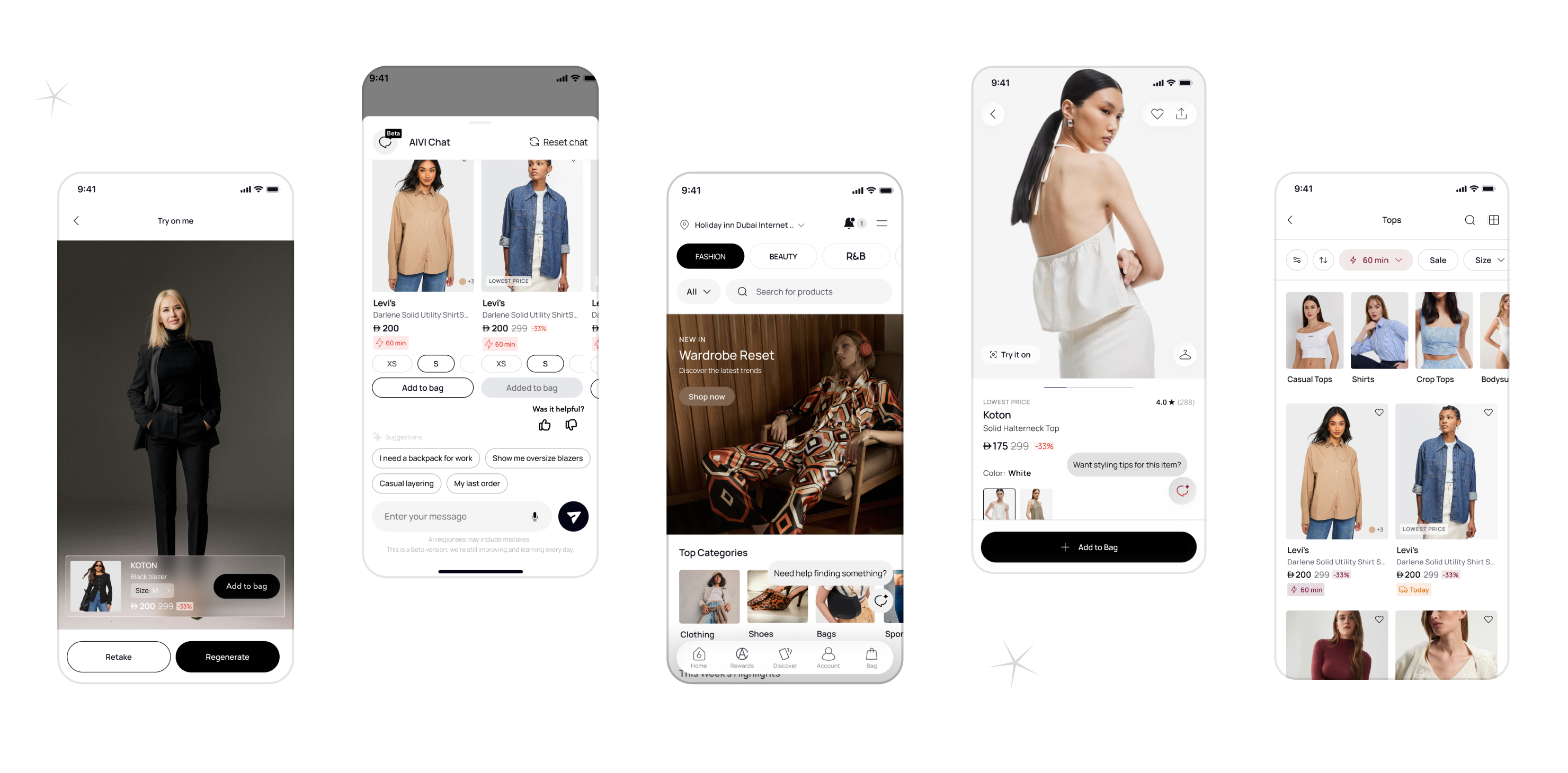
Designed a unified AI-powered chat experience for returns, exchanges, order tracking, and outfit discovery. Integrated AI into both the product (conversational assistance and personalization) and the design process (Figma AI), enabling faster iterations and more efficient exploration of design solutions.
Problem : Online fashion customers have no conversational, context-aware way to manage their post-purchase experience. Returns and exchanges are buried in static flows, order tracking requires multiple taps, and product discovery is completely disconnected from purchase history resulting in high support volume, abandoned exchanges, and missed re-engagement opportunities.
Key Design Challengesm : The hardest problem was building trust in an AI users had no prior relationship with. Usability testing revealed a significant trust gap at the exchange confirmation step, leading to a full redesign of that moment before launch. The second challenge was defining the boundary between AI and human knowing exactly when to escalate, and making that handoff feel seamless rather than like a failure.
AI-powered chat in e-commerce is growing, but most implementations solve only one side of the problem. H&M and Zara offer conversational support flows, but they are scripted and transactional. ASOS has strong discovery but no conversational layer. Klarna handles payments and tracking but stops at the order level. No single product in the competitive set bridges post-purchase support and proactive discovery in one unified experience.The gap is well-documented: 71% of customers expect personalised interactions, yet fewer than 30% of fashion apps offer any form of AI-driven post-purchase engagement. This feature was designed to close that gap.
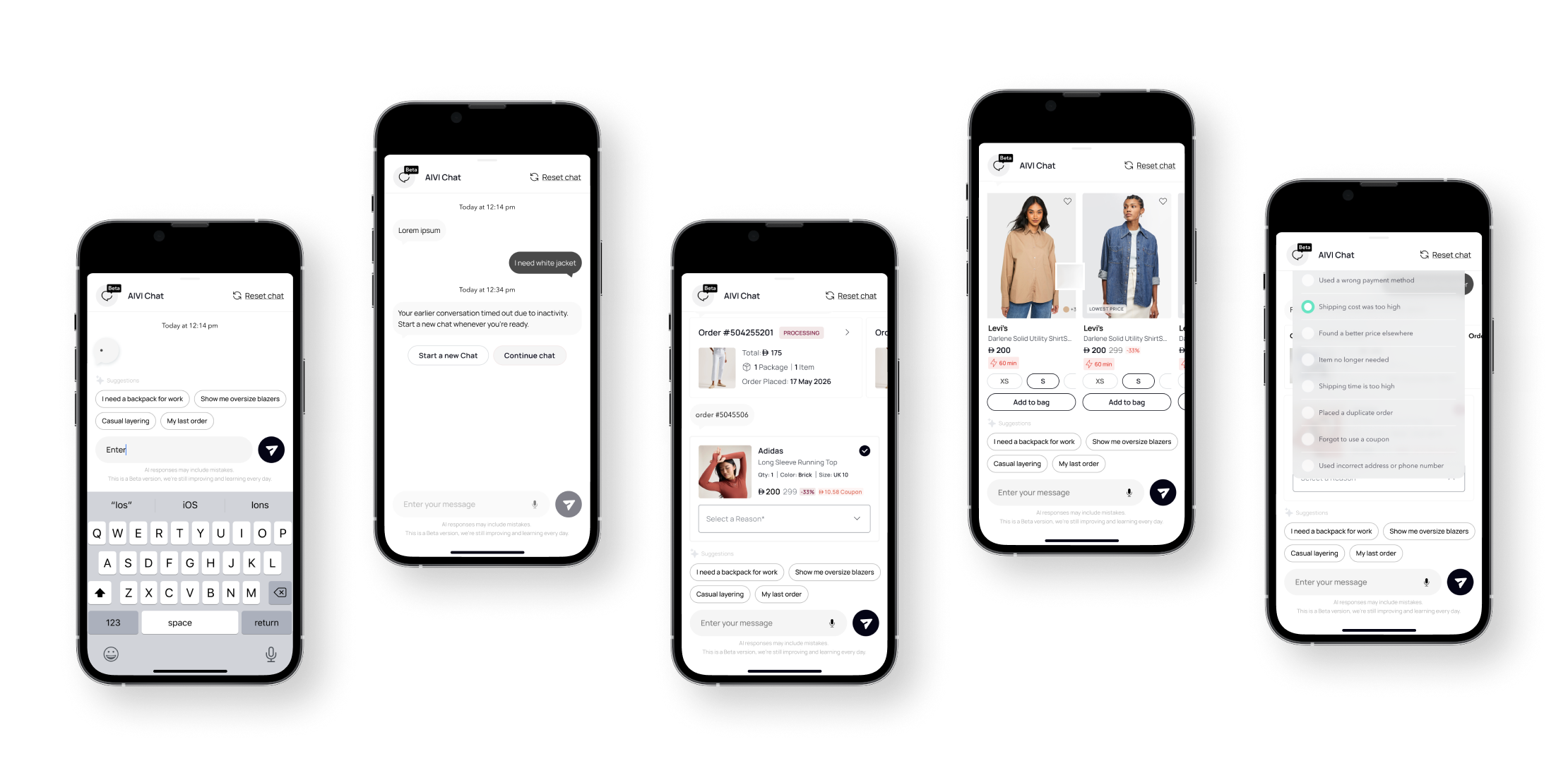
1. Entry point
The chat icon is accessible within one tap from any order screen, the home feed, and the product detail page. A proactive nudge triggers automatically at key moments a delayed delivery, an approaching return window, or a recently browsed item left in the cart.
2. Intent recognition
The user types or selects a quick-reply chip. The AI identifies the intent tracking, return, exchange, or discovery and pulls the relevant order or product context without the user needing to provide order numbers or navigate elsewhere.
3. Task resolution
For order tracking, the AI surfaces real-time status with an estimated delivery window inline in the chat. For returns, it walks the user through eligibility, reason selection, and label generation in a guided conversational sequence. For exchanges, it confirms size availability, shows alternatives if the requested size is out of stock, and presents a clear order summary before commitment.
4. Discovery layer
At any point, the user can ask the AI to find a product or complete an outfit. The AI surfaces inline product cards image, price, size selector directly inside the conversation. Items can be added to cart without leaving the chat.
5. Escalation
If the AI cannot resolve the request with sufficient confidence, it hands off to a human agent with full conversation context preserved. The transition is explicit the user is told a human is joining and the chat thread continues uninterrupted.
6. Closure
Once a task is complete, the AI offers a natural next step: track the return, explore similar items, or browse new arrivals based on purchase history. The session ends with a clear confirmation and a single follow-up suggestion, never a wall of options.
Used tools are: GA4 + Mixpanel
Resolution time was measured using our customer support analytics. We tracked the time between the user initiating the request and the issue being successfully resolved. The results were monitored through our analytics dashboards.
71% of support queries resolved by AI without human escalation
Resolution time reduced from 4.2 minutes to under 45 seconds
Exchange abandonment dropped from 41% to 19%
Support ticket volume down 38% 2.4x higher add-to-cart rate for users who engaged with outfit suggestions
Session depth increased 22% among chat feature users
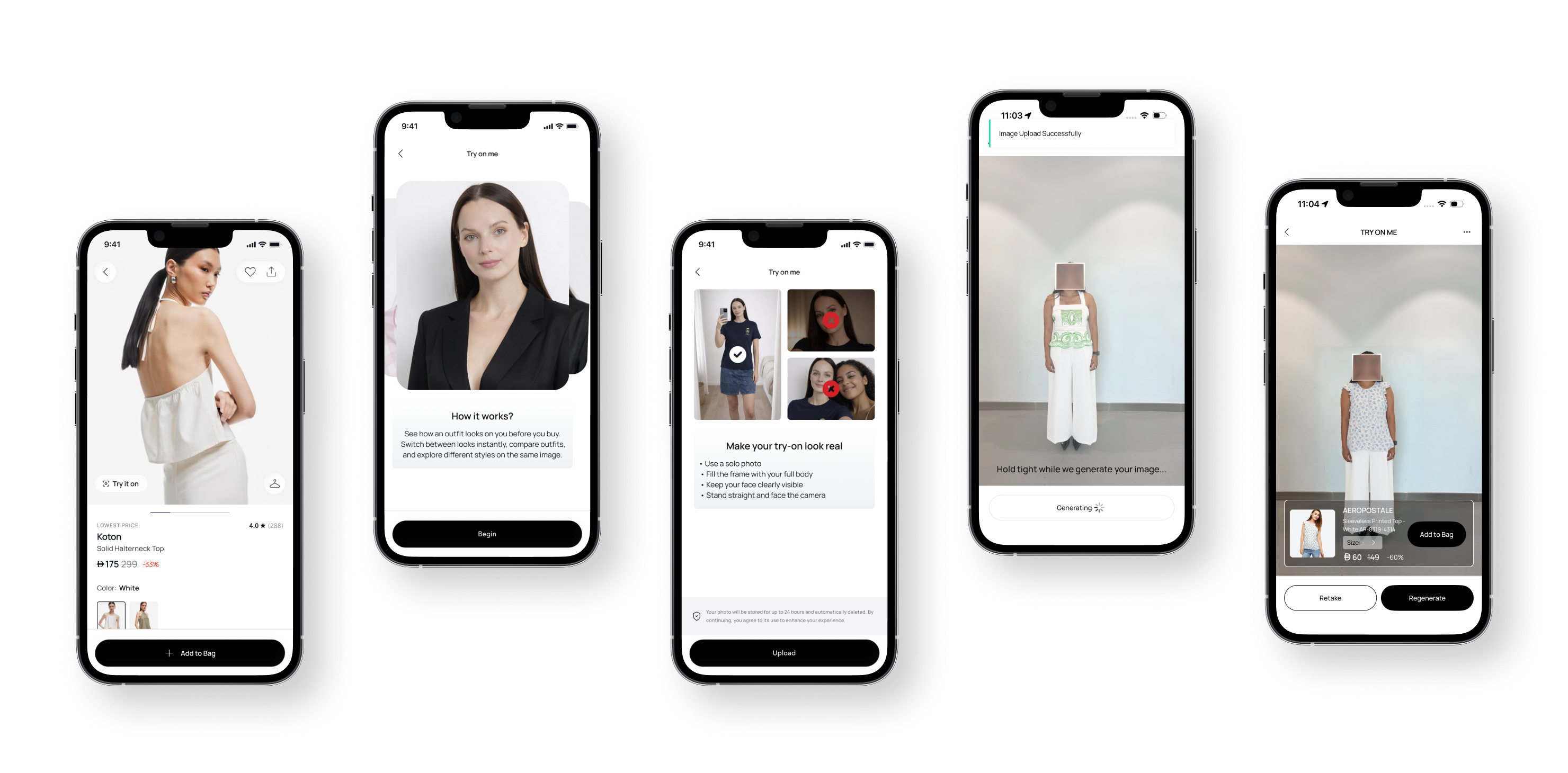
User Goal Visualize outfits on their own body before purchasing.Make faster, more confident purchase decisions.Reduce uncertainty around fit and style.
Business Goal increase purchase confidence.Improve conversion rate.Reduce return rates related to fit and style.Strengthen customer trust and engagement.
AI Role in the Experience
AI was used not just as a visual generator but as a decision support system.AI Capabilities: Body detection & pose estimation Garment overlay & fitting simulation Image processing & refinement Real-time preview generationAI is treated as a confidence engine, not a gimmick.
North Star Metric: Conversion Rate uplift driven by AI Try-On adoption while reducing fit-related returns.
Online fashion shoppers face two major uncertainties:
“Will this fit me?”
“How will this look on my body?”
This uncertainty leads to:
Lower conversion
Higher return rates
Lower confidence in purchase decisions
Traditional static product imagery fails to communicate real fit and proportion, especially for first-time buyers.
To define the experience, I analyzed leading AI-styling and virtual fashion platforms:
Reference 1 is : Stylitics AI-driven outfit bundling and styling engine that increases AOV and drives outfit-level shopping rather than single-item purchases. Their strength lies in personalized outfit recommendations and bundling.
Reference 2 is : DressX Focuses on digital fashion try-ons and virtual wearables, emphasizing identity, self-expression, and virtual representation rather than physical garment purchase.
Key Insight:
Existing solutions either focus on styling recommendations (Stylitics) or virtual fashion identity (DressX). There’s a gap in combining real-world fit preview + purchase confidence inside a native commerce flow.
1. Entry Point (PDP)
A Try It On action is placed directly on the product detail page, keeping users in the purchase journey rather than diverting them elsewhere.
2. Consent & Camera Access
Users are guided to capture a full-body image with clear instructions: Solo photo Full body visible Straight posture Clear lightingThis ensures optimal AI accuracy.
3. AI Try-On Generation
The uploaded image is processed using AI to generate a realistic try-on visualization.
During processing: Progress states manage expectations
Visual feedback reduces uncertainty
System messaging reinforces trust
4. Interactive Try-On Experience
Once generated, users can: View the garment on their body Switch outfits instantly Adjust sizes Add items directly to bagThis reduces decision friction and increases purchase confidence.
Business Impact & Results
Tools used: Hotjar , Mixpanel + GA4
The Try On Me feature was designed to directly influence purchase confidence and reduce uncertainty-driven friction in the buying journey.After launch, the feature demonstrated strong impact across both user behavior and business metrics:+18% increase in conversion rate among users engaging with the try-on experience+40% increase in purchase completion for users who previously struggled with sizing and fit decisions+30% improvement in customer confidence in size and style selection (measured through post-purchase feedback)-25% reduction in size-related return rates, leading to lower operational and logistics costs+50% increase in feature engagement within the first three months after launch
Behavioral Insights
Users who interacted with the feature spent more time on PDPs and showed stronger intent signalsThe ability to visualize products on themselves reduced hesitation at key decision momentsQualitative feedback highlighted ease of use, clarity, and perceived usefulness as primary drivers of satisfactionThe feature shifted user behavior from browsing to decision-making.
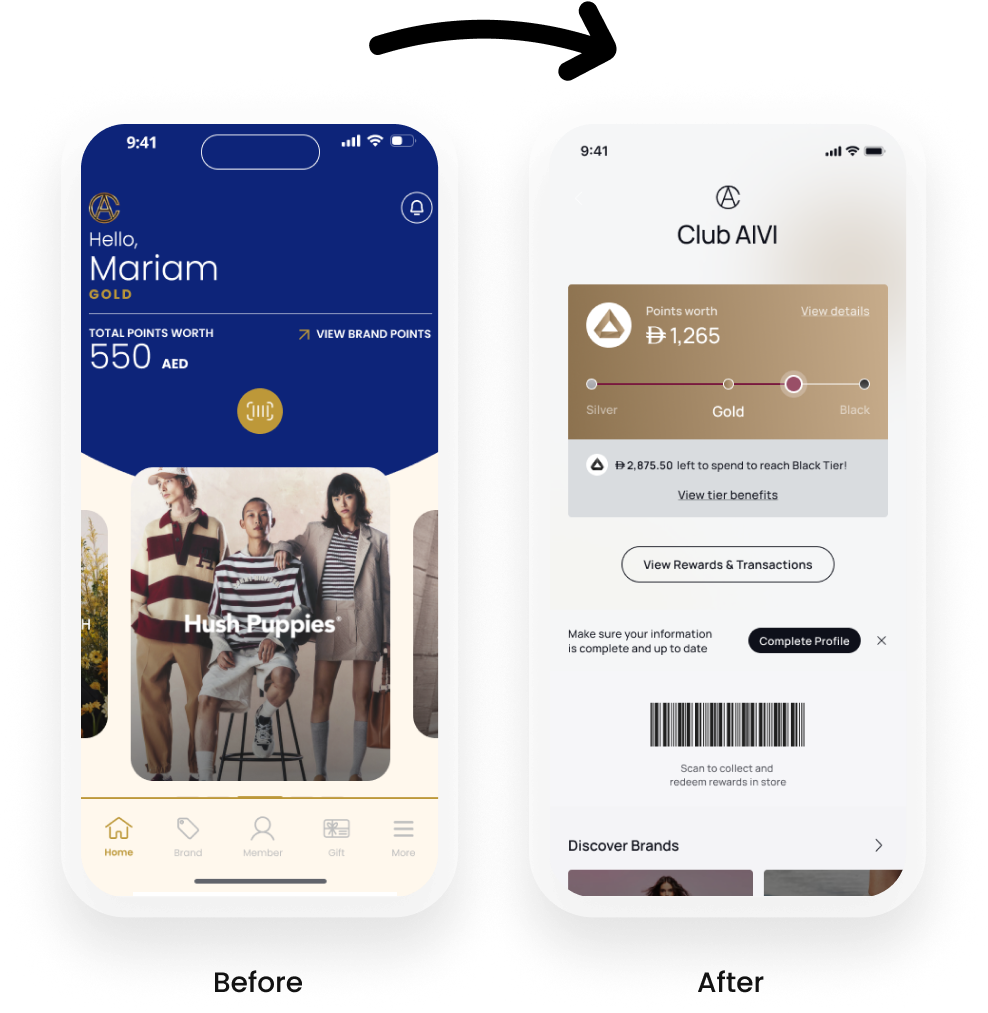
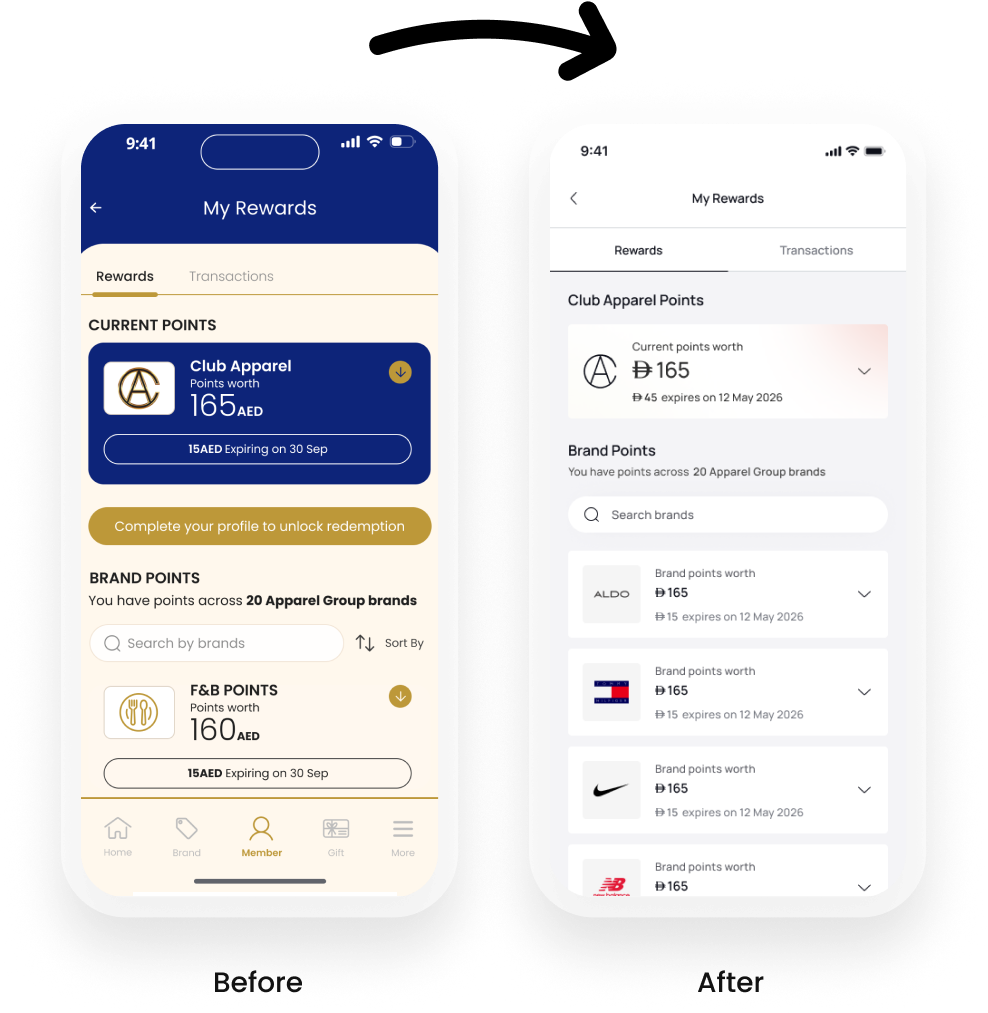
Club Apparel and 6thStreet were two separate products that didn't talk to each other. A loyal Club Apparel member and a frequent 6thStreet shopper could be the same person, earning points in-store with no way to use them online. Two separate design systems, two separate accounts, two separate experiences.My brief: merge them into one.
The problem was that these two products didn't talk to each other. A customer could earn points in-store and have no idea they could use them online. A loyal Club Apparel member and a frequent 6thStreet shopper could be the same person, and neither the product nor the business would know it.My brief was to change that: merge both apps into a single superapp, unify the loyalty experience across online and offline, and in doing so, unlock a richer, more connected experience for millions of users across MENA.
Outcome
+7% checkout conversion
+30% user trust scores
+50% engagement from AI personalisation
+40% purchase completion across targeted segments
Feature conversion: 2.08% – 6.92% across verticals
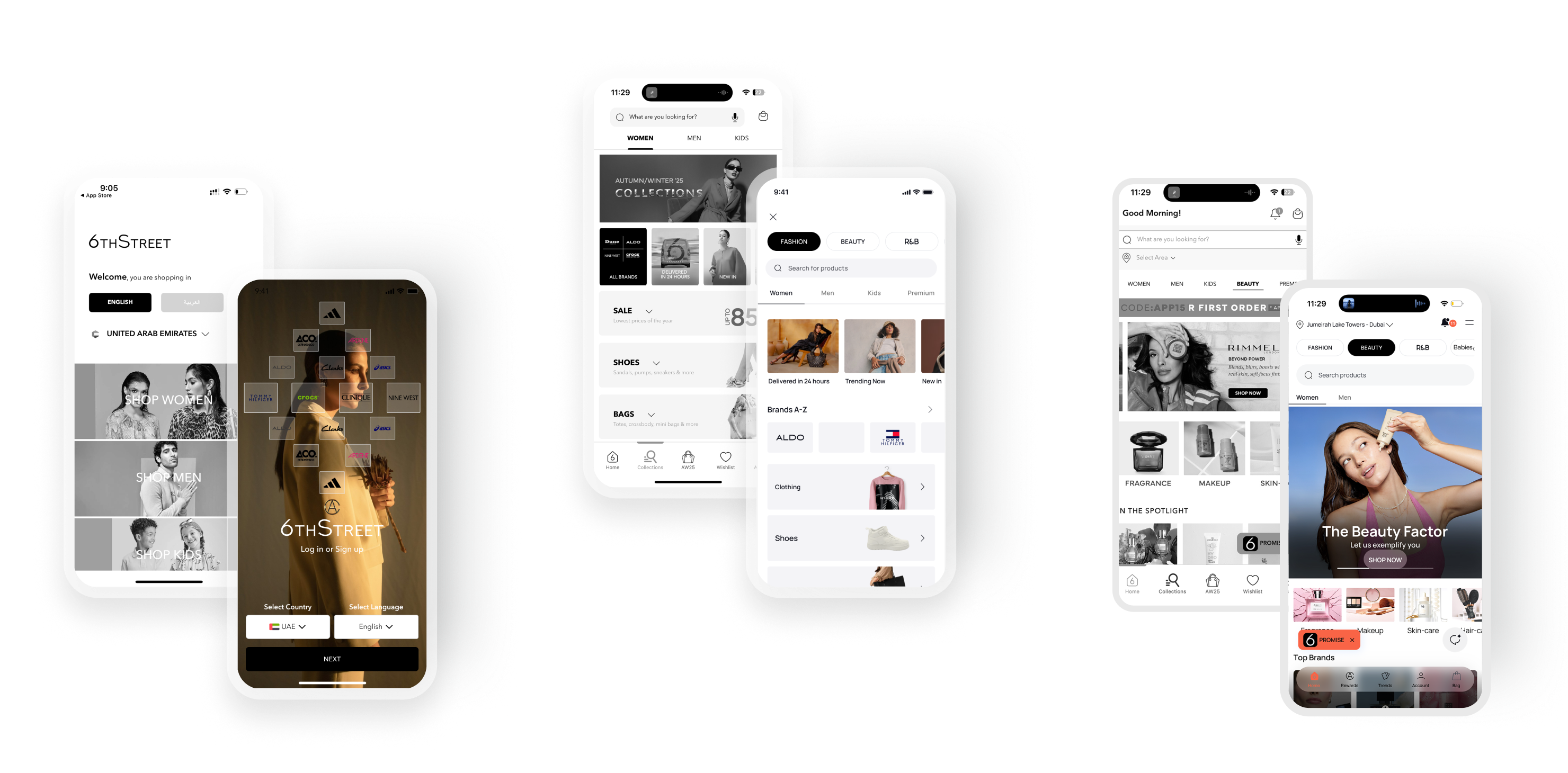
I owned the entire design as the sole designer, from information architecture to final UI.
Unified loyalty across online and offline. Users could now earn points from any order, in-store or online, and redeem them at checkout. Gift cards became transferable between friends. A shared wallet brought points, gift cards, and payment methods into one coherent step.
Tier-based personalisation. Silver, Gold, and Black members each received a distinct customer journey layered on the same architecture. Elevated content, early access, and progress indicators were woven into browsing and checkout flows based on membership level.
Checkout redesign. Rebuilding trust signals and payment UI around the new wallet system delivered +7% conversion, +0.8pp purchase completion, and +30% user trust scores.
AI-powered features. I designed and shipped an AI chatbot, a size recommendation engine, and a behavioural personalisation layer, driving +50% engagement and +40% purchase completion across targeted segments.
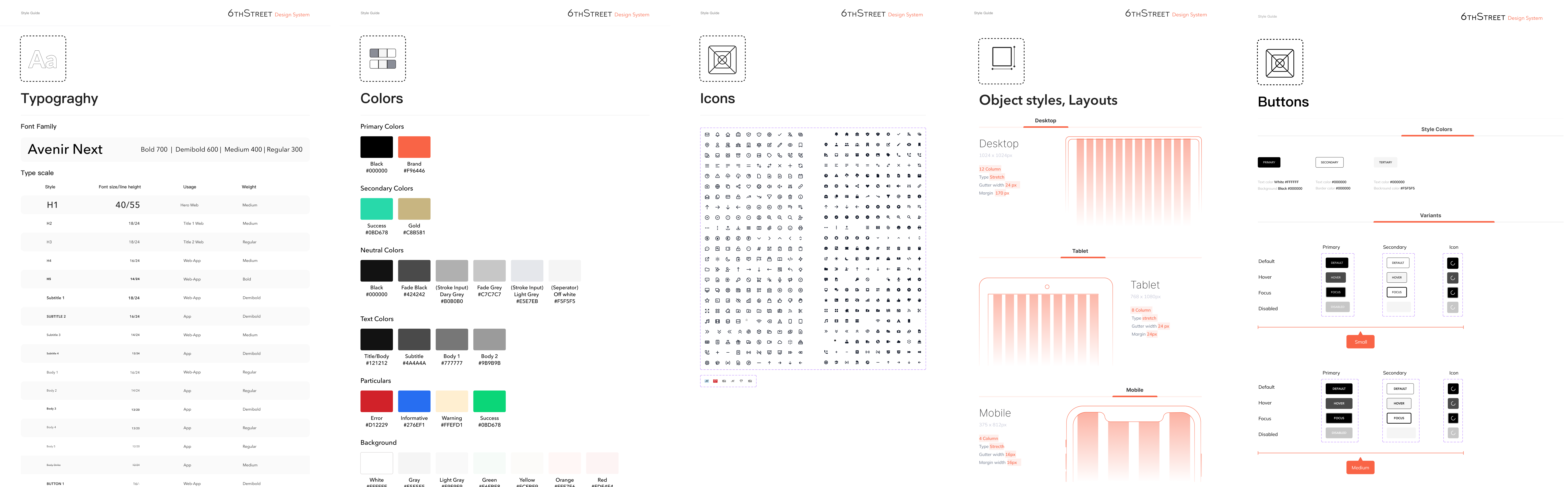
Design system rebuild. I consolidated both apps' component libraries into a single cross-platform system across mobile, web, and tablet, documented for both designers and engineers.
Superapp foundation. As Apparel Group expanded into F&B and lifestyle verticals, the unified design system and architecture I built became the foundation for an evolving social lifestyle platform.
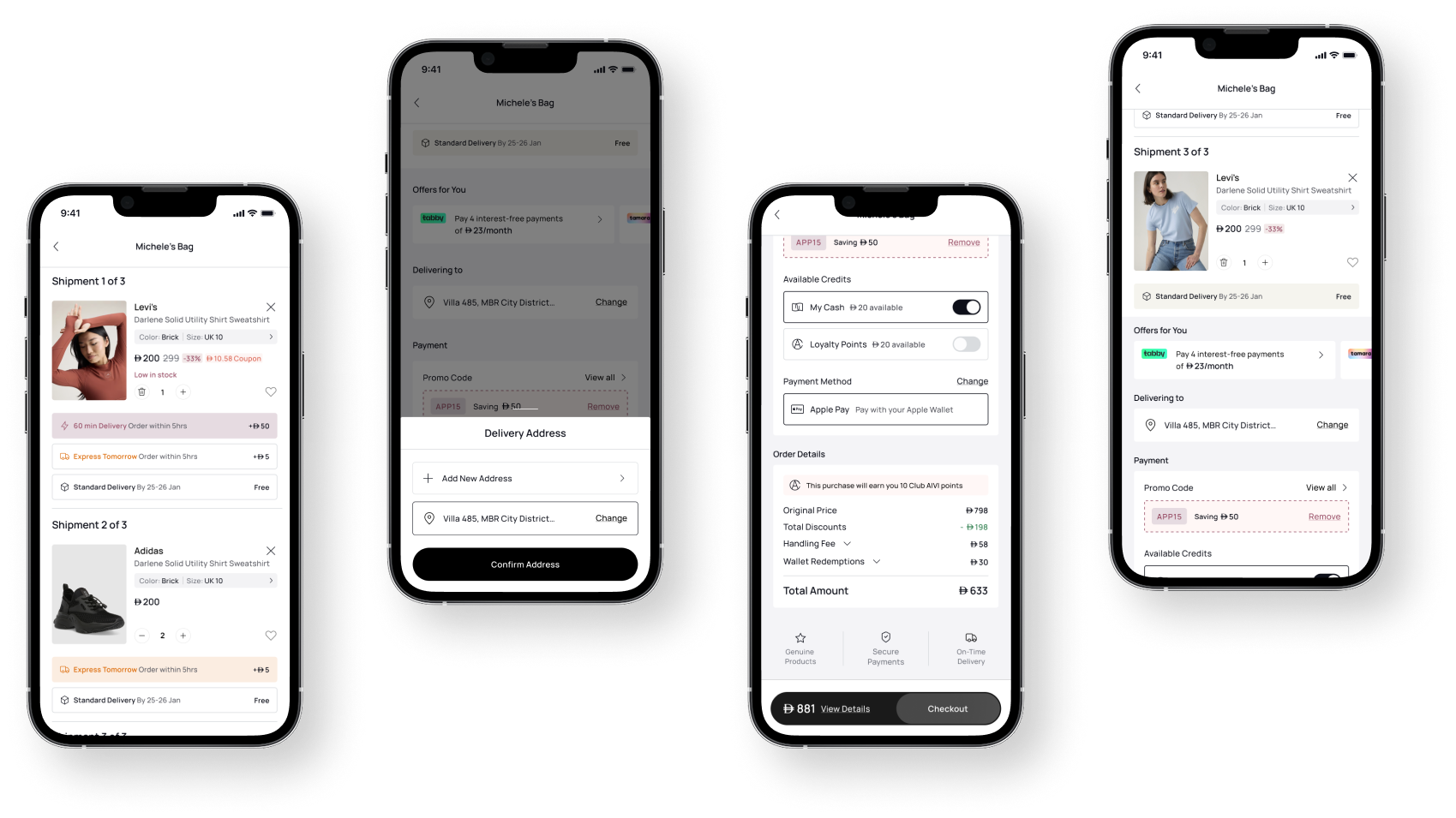
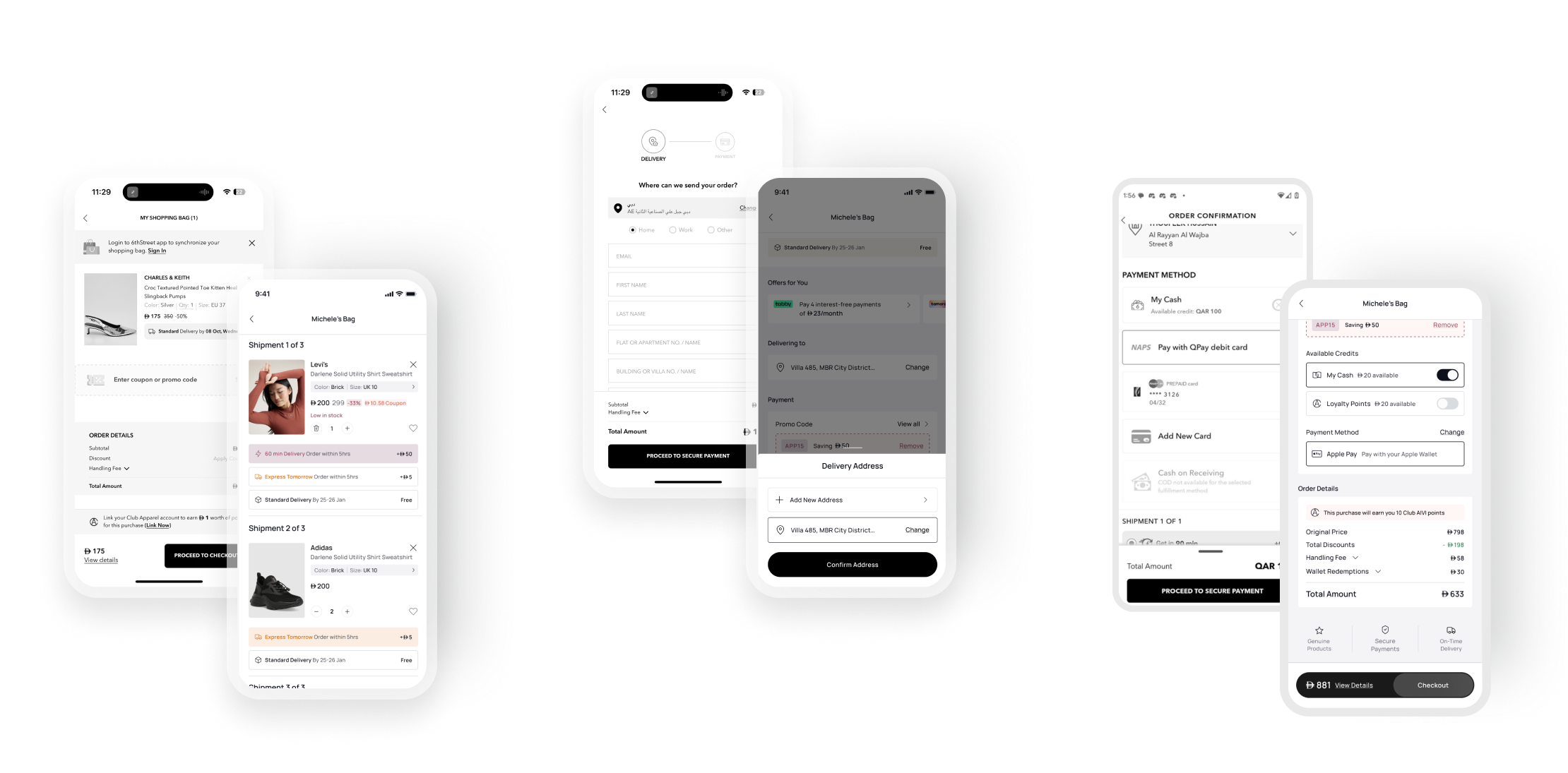
Redesigned the traditional shopping bag into a single-page checkout experience, combining shopping and payment in one seamless flow. The new design reduced friction, increased transparency, and accelerated purchase decisions through integrated delivery information, loyalty rewards, and interactive product cards.
Outcome: A faster, more intuitive checkout experience that transformed purchase intent into completed orders while improving user confidence and conversion potential.
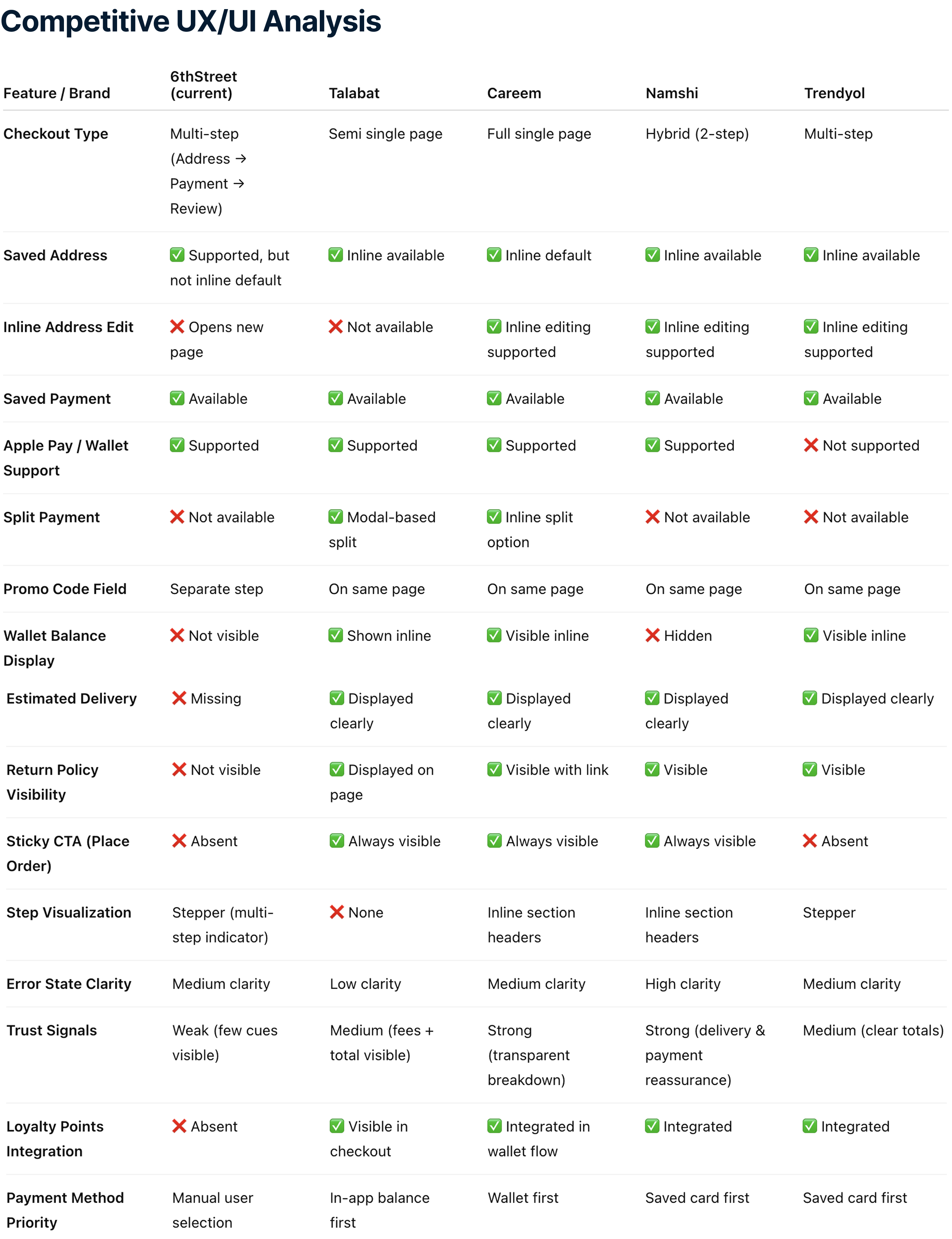
Inspiration from some GCC apps.
TalabatWallet-first payment flow speeds up checkout.
Split payment through modal is clear and flexible.
Strong trust signals and transparent pricing breakdown.CareemFully inline editing with collapsible sections.
Single-page checkout with minimal friction.
Loyalty and credits integrated directly in the payment flow.NamshiHybrid flow with strong visual hierarchy.
Clear promo and payment integration.
Good delivery promise communication.
Inspiration from some GCC apps.
Talabat
Wallet-first payment flow speeds up checkout.
Split payment through modal is clear and flexible.
Strong trust signals and transparent pricing breakdown.
Careem
Fully inline editing with collapsible sections.
Single-page checkout with minimal friction.
Loyalty and credits integrated directly in the payment flow.
Namshi
Hybrid flow with strong visual hierarchy.
Clear promo and payment integration.
Good delivery promise communication.
Features
-Simple Shopping Bag Layout:Displayed products with basic information (e.g., name, price, color, size).
Lacked interactive controls like quantity adjustment or wishlist addition.
-Coupon Input Field:A separate input field for entering promo codes.
-Order Details Section:Subtotal, coupon savings, handling fee, and total amount were visible.
Limitations
-Lack of Quick Checkout Options:Users needed to proceed to another screen to finalize delivery options and payment.
-No Personalization or Encouragement:Missed opportunities to nudge users with benefits like "X users added this to their cart."
-Limited Interactivity:No direct options to modify quantities or save products for later.
-Minimal Visual Hierarchy:Important actions like proceeding to checkout were understated..
-Integrated Bag and Checkout Workflow:Combines shopping bag and checkout steps into a single screen for a faster, smoother experience.
-Interactive Product Card:Added:Quantity selector (+/- buttons)."Add to Wishlist" option for saving items.Includes social proof with "50 users added this to checkout."
-Delivery Options:Quick toggle between:Express Delivery with additional charges.Standard Delivery for free.Delivery deadlines clearly communicated for urgency.
-Enhanced Promo Code Interaction:Includes a recommended promo code (e.g., "JULY"), making it easier for users to save Actionable "Apply" button.
-Payment Section:Displays available credits and reward points, motivating users to use their rewards immediately.Example: "Eligible to use AED 10 of AED 47."
-Improved Visual Hierarchy:"Place Order" button is prominent, reducing cognitive load for the next action.Sections for delivery, promo codes, and payment are clearly segmented.
Benefits of the New Design
-Time-Saving:Reduces the steps needed to place an order.
-Engagement:Personal touches (e.g., social proof, rewards) encourage quicker conversions.
-Clarity:Enhanced visual hierarchy ensures important details are not missed.
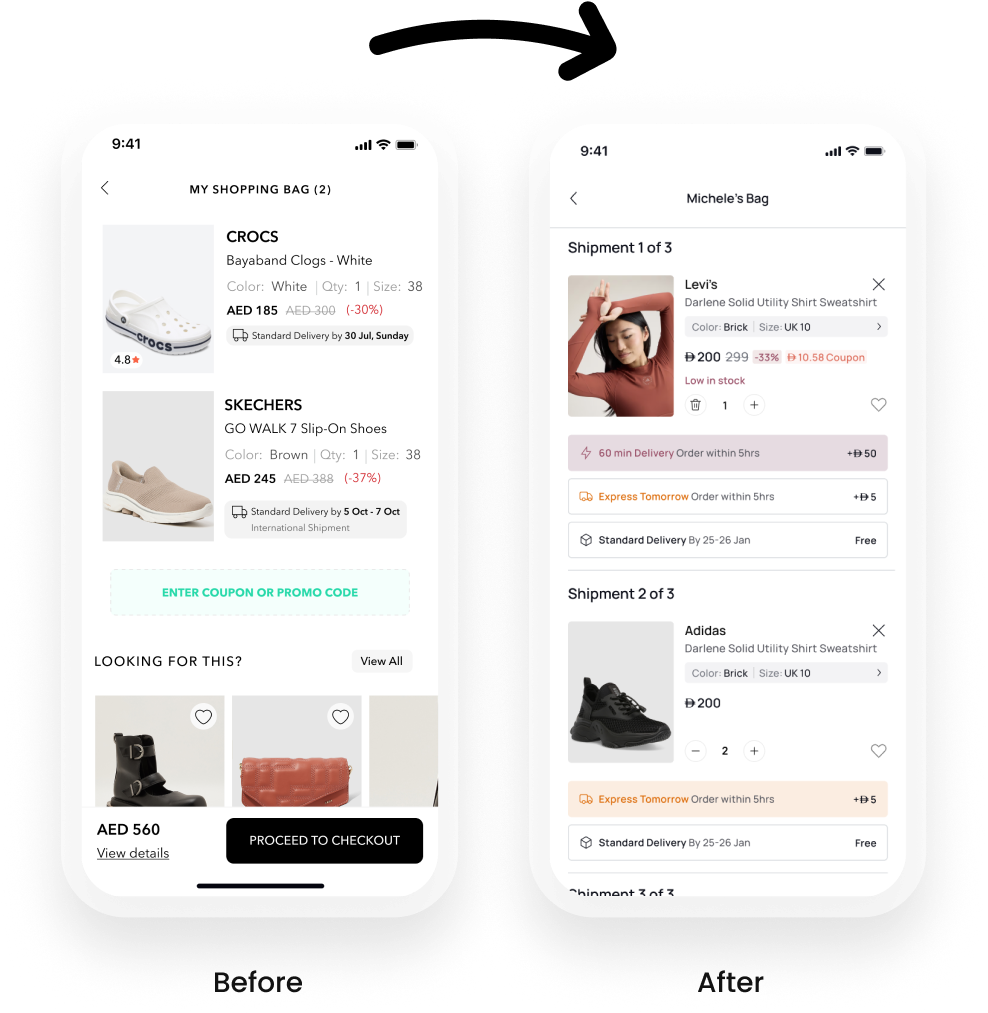
Old Design
Friction in the shopping and checkout process.
Limited engagement and personalization opportunities.
New Design
Faster and more engaging checkout experience.
Increases trust and satisfaction with transparent delivery and payment details.
Encourages impulse purchases with social proof and reward point usage.
The Single Page Checkout design reduces the steps needed to place an order while enhancing the visual hierarchy and its delivered a ~6–7% relative uplift in overall conversion rate and a +0.8 percentage point increase in purchase completion, resulting in a direct increase in total orders and a more streamlined path to checkout.
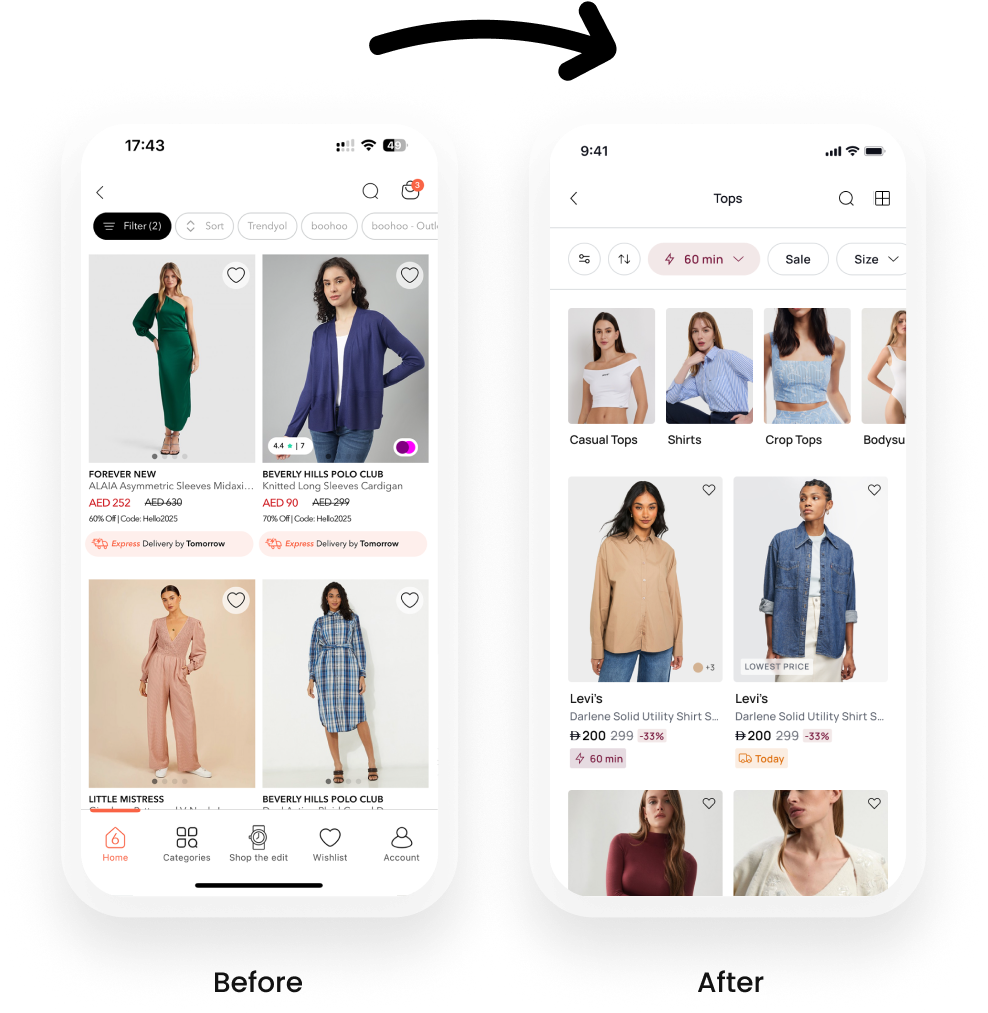
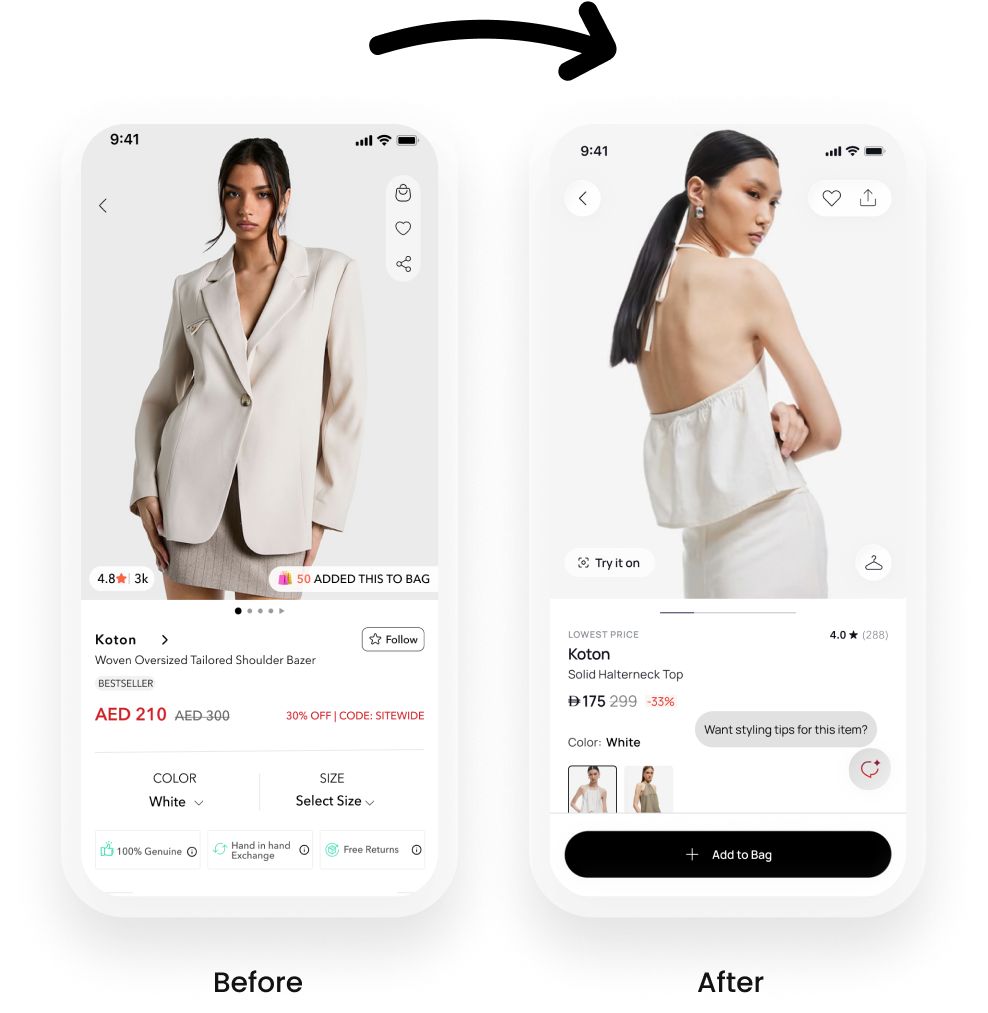
As a Product Designer at 6thStreet, a prominent fashion e-commerce platform in the GCC region, I took ownership of redesigning the Product Listing Page (PLP) and product card components. The objective was to elevate the user experience, align the interface with evolving market standards, and drive measurable improvements in user engagement and conversion rates.
Behavioral data revealed that:
Key product information was getting lost due to visual clutter and inconsistent hierarchy on product cards.Lack of urgency or incentives to convert quickly.
PLP designs didn’t clearly differentiate discounted or time-sensitive products.
Bounce rate on PLP was higher than industry benchmark.
Users often couldn’t distinguish between full-price and discounted items at a glance.
To gain a deeper understanding of market expectations and user psychology, I conducted:
Competitive benchmarking across key regional and global e-commerce players (e.g., Namshi, Farfetch, Ounass etc).
Heuristic evaluation of 6thStreet’s existing experience.
Heatmaps & clickstream analysis using analytics tools.
Quick user interviews with fashion-savvy consumers.
Key Insights Identified:
Visual hierarchy must direct attention to discounts and urgency features.Competitors utilized badges and micro-copy effectively to highlight exclusive perks.
Overuse of text blocks was causing cognitive load.


Collaborated with Product Managers and Developers during sprint planning to prioritize the feature.Created design specs and interaction prototypes in Figma.Ran design QA sessions post-implementation to ensure pixel perfection.Worked with data team to track KPIs post-release.
A/B Testing Results (2 Weeks Post-Launch):
+17% increase in Add to Cart from PLP
+23% increase in PLP to PDP click-through rate
+12% conversion rate for products tagged with Get it in 60 min
-9% bounce rate on PLP pages
Tools & Methods Used
Figma – for high-fidelity design & prototyping
Tableu + Hotjar – for user testing & behavior analytics
Google Analytics – for KPI tracking
Jira – for handoff & task management

6thStreet is a leading eCommerce platform offering a diverse range of fashion brands. One of the primary challenges in online shopping is ensuring customers select the right size, as sizing standards vary across brands. To address this, I developed an AI-powered feature called "Can't Find Your Size?" that guides users in selecting their optimal fit based on personalized inputs.
Many users face ongoing challenges due to inconsistent sizing standards across different brands, which often results in confusion during the selection process. This lack of uniformity contributes significantly to high return rates, as customers frequently receive items that do not fit as expected. Over time, these negative experiences can erode trust and reduce overall confidence in the online shopping experience, ultimately impacting customer satisfaction and brand loyalty.


This feature provides users with personalized size recommendations by leveraging an intelligent algorithm that considers brand-specific size variations. Users enter their height, weight, and age, and the system predicts the best size for them based on brand-specific sizing patterns.

25% reduction in size-related return rates, decreasing logistical and operational costs.18% increase in conversion rates for users engaging with the feature.
30% higher customer confidence in size selection (measured via post-purchase surveys).
40% of users who struggled with sizing used the feature to make a purchase decision.
User engagement with the feature increased by 50% in the first three months after launch.
Positive feedback from users in qualitative surveys highlighted the ease and effectiveness of the feature.
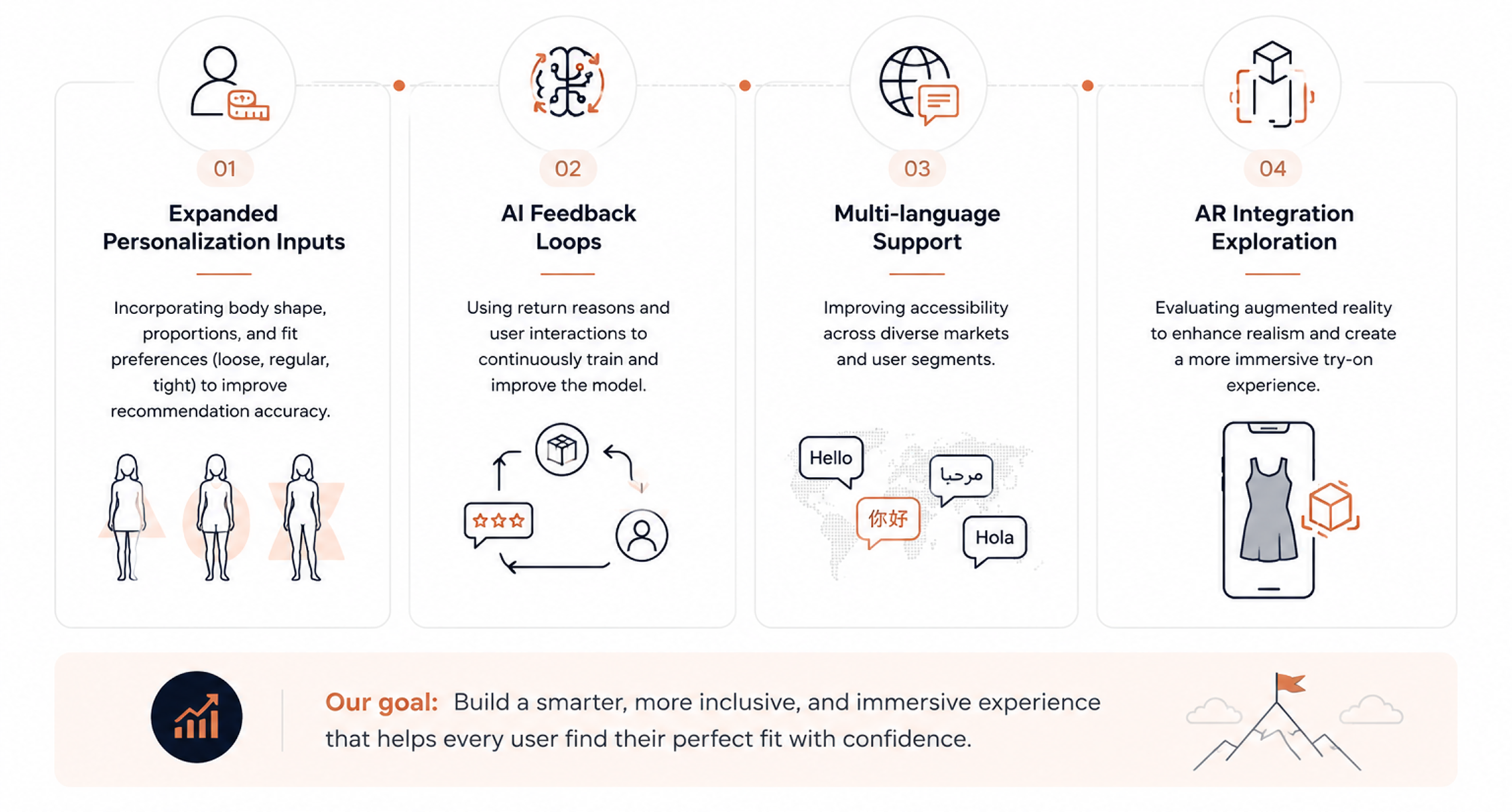
Future Enhancements & Next Steps
Expansion to more data points: Incorporate additional user inputs such as body shape and fit preference (loose, regular, or tight fit).Enhanced AI learning: Improve machine learning models by integrating AI-driven feedback loops from return reasons.Multi-language support: Provide multilingual assistance to improve accessibility for diverse user bases.Integration with AR sizing technology: Explore the potential of augmented reality (AR) for an even more personalized shopping experience.

The goal is to aim provide user-centric and efficient solutions;
Increase User Engagement: Introduce an exciting and interactive way for customers to interact with the app.
Boost Conversion Rates: Encourage purchases by offering rewards and discounts tied to specific conditions.
Ensure Scalability: Build a system flexible enough to adapt to varying country-wise rules, promotional strategies, and reward types.
Designed a gamified rewards system to boost user engagement by analyzing competitors and user behavior. Developed configurable reward types and rules (e.g., timing, frequency), built probability-based logic to ensure fairness, and crafted an intuitive scratch-and-win UI. Ensured seamless cross-platform functionality and collaborated with backend teams to integrate Magento for coupon validation, with thorough testing across regions and expiry scenarios.


The Scratch and Win feature provided users with a fun, engaging, and rewarding shopping experience, transforming the typical e-commerce journey into an interactive activity. By offering instant rewards such as discounts, cashback, and free items, it incentivized purchases while fostering excitement and anticipation. Users appreciated the transparency and fairness of the feature, with customizable rules ensuring equal opportunities for everyone. The seamless integration across platforms (app and PWA) allowed users to redeem rewards effortlessly, enhancing convenience and satisfaction. Ultimately, this gamified experience not only made shopping more enjoyable but also created a sense of value and exclusivity, encouraging repeat visits and loyalty to the platform.

20K+ users engaged during the initial launch, validating strong interest in gamified experiences.
Conversion rate increased from 2.08% to 6.92% within two weeks.
20% longer session duration among users who interacted with the feature (A/B test).
30% higher reward redemption, driven by personalized incentives and flexible reward types.
Higher coupon redemption and repeat purchases contributed to improved customer retention and loyalty.
Configurable campaign settings (hourly, daily, event-based) enabled scalability across different markets and promotions.
Key Outcome: The Scratch & Win experience successfully increased engagement, conversion, and customer loyalty while providing a scalable framework for future promotional campaigns.
